ssh and geni-lib
Lab1 - Basic Lab Environment Setup
Objective: Prepare host environment, user credential settings, portal setup, and the lab’s virtual machine that hosts geni-lib.
Skills Required for Activities: Basic Linux command line interface with simple editing, copying of files, creating keys for ssh, moving files, creating directories. Understanding of the virtualization environment with a hypervisor application (e.g., VMware workstation, VMware fusion, VirtualBox, etc.) helping run a virtual machine in user hosts (student’s computers, Windows or MAC).

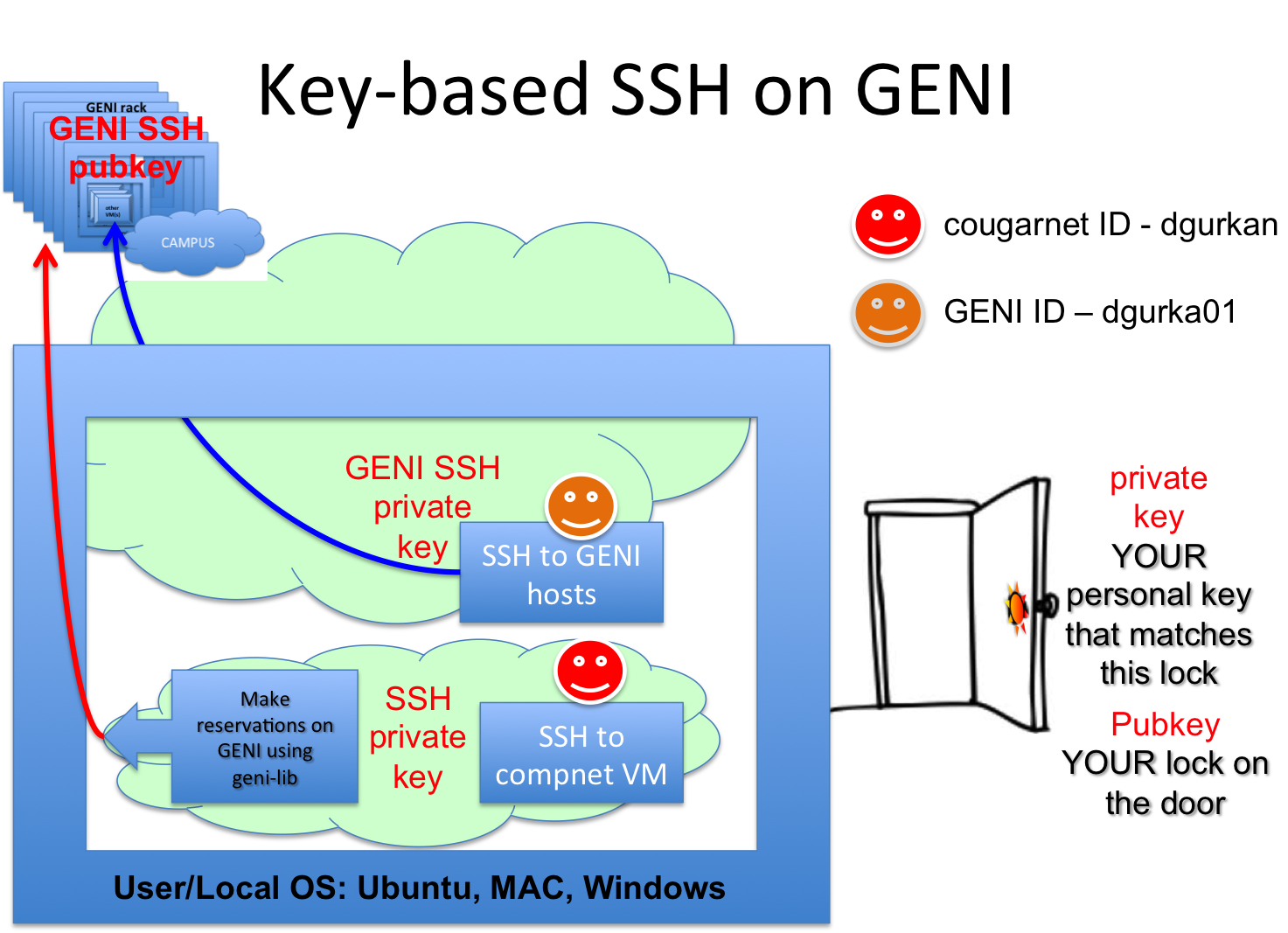
The private and public key pair is used to setup a lock and a key to access our hosts (resources) on GENI and other such environments. The virtual machine (VM) to be used in this lab will also be accessed through such a key pair. Therefore, a public key is placed within the VM while the private key on student’s home devices (windows and mac laptops or the lab desktops) will be used to access the VM on the host or on GENI testbed.

The private key that matches the public key is the only key that can open the door - therefore, giving access to the user on the VM.

The testbed view over the network is a scaled-up version of the individual systems in the 4421 labs. A host computer (student laptop or lab desktop) has a hypervisor enabling the hosting of a VM. Similarly, GENI infrastructure is composed of such virtualization architectures to offer such access and resource usage.
Learning Outcomes:
- Basic linux environment, command line familiarity, copying files between VM and host, a personal cheat sheet creation for the class.
- First knowledge and experience with public/private key pair generation and pure key-based access to virtual machines.
- First time installation of a hypervisor into systems as well as lab computers along with importing of a virtual machine (VM) provided as part of the labs.
Assessment of Learning Outcomes: Students will be able to create a file in their host machines and copy this file into their virtual machines. And then, students will ssh into their VM, create a new directory in their VM, move the file from their host into this directory while in the lab. A new key pair can be generated to illustrate how key exchange works.
ssh process can be generalized into its use to access systems through key management. Any application may utilize public/private keys to enable user access.

Examples of such key exchange illustrate the usage of the key to provide access to users in different systems.

Teaching Journal: The system differences between Windows and MAC Operating Systems along with the Linux-based OSes pose a steep learning curve challenge in the labs. While students are able to help each other, windows users are not able to utilize the easy terminal access that Mac users have. And, on the other hand, Mac users are not able to adapt to the terminal command line since their expectation has always been the drag-and-drop user interface with strict mouse-oriented interaction. A one-on-one interaction and training is necessary during this first lab to get everybody setup with the correct configurations. However, a do-it-at-home-by-yourself-a-few-times may need to be assigned going forward to remove any discrepancies in the setup process.
Lab2 - GENI Interface with Python Library, geni-lib
geni-lib: http://geni-lib.readthedocs.org
Objective: Learn and observe how geni-lib Python interpreter command line
works. More information on geni-lib is at documentation and source code site. Retrieve advertisement from the GENI federation
to investigate what resources may be available. Solidify the understanding of
virtualization technologies, key-based user access, and linux basics on file
transfer between virtual machines and host systems.
Skills Required for Activities: Interact with a Python interactive interpreter
command line to issue script commands. Utilize command line and Python object
directory search, entry, and help to navigate the geni-lib library. Further
deepen the understanding and skills on Linux, virtualization, and the lab
environment.
Learning Outcomes:
- Students will be able to interact with Linux command line interface (CLI) to accomplish changing directories, copying files, checking what files are where, and creating their SSH keys.
- Students will be able to create an automated environment for their SSH
sessions with future GENI hosts and their current computer networking
virtual machine (VM). For windows users, create and save an ssh and a
winscp session for the lab VM using their private key and user name. For
MAC users, create a
.ssh/configfile with ssh login info using their private key and login name. - Continue on with
geni-libexperimentation to familiarize with the python interpreter and the GENI federation. - Students will be able to setup their
geni-libenvironment with their own context using thecontext-from-bundleutility.
Assessment of Learning Outcomes: A demonstration that student’s genish
session runs as expected with a relevant reply from the federation resources when the
student requests an advertisement from an aggregate manager. Instructor
and the teaching assistant observed whether such an advertisement was retrieved by
the student on his/her VM at the end of the lab session.
Teaching Journal: Students had a difficult time following what an error message may say. There is a lack of trust in their ability to read instructions on the screen and then figure out what may be missing in their system and setup. This is mostly due to them lacking Linux CLI skills. By going through many samples from station to station we have tried to emphasize the reading of the error messages.
The students were still struggling with the SSH connectivity issues due
to the formatting differences between public keys generated at Windows OS
and Mac. Most of the time, public key was not matching the private key
although they were generated correctly. PUTTYGEN key pair generation has some
incompatibility with the Linux and Mac cases. geni-lib is being patched to
catch such error cases and either raise a knowledgable exception or correct the
errors from such incompatibilities through internal means (e.g., remove the
extra “n”, etc.).
The relationships between all software systems and the key generation process is included here:
